Just like other media companies, the publishing industry with magazines and newspapers is struggling with the fact that the reading habits and needs of target groups have changed. Media is consumed differently than before. There is a preference for digital and short, concise content on mobile devices. In addition, digital platforms, social networks and a multitude of other content providers are competing for readers’ attention. This challenges publishers not only to adapt their content, but also to offer it in other formats on different touchpoints that meet readers’ new preferences.
Digitalization is forcing innovative strategies, technologies and a change in publishing: a digital transformation. Publishers are therefore faced with the task of adapting their strategies and investing in new technology in order to make the transition from traditional to digital formats. This is where digital publishing software comes into play. Here we explain what publishing software is, the best practices for publishers and newspapers and how desktop publishing software differs from editorial systems.
Contents of this page
What is desktop publishing software?
Desktop publishing software, abbreviated to DTP programs, is software used to create visually appealing publications. It is not just about text and especially no longer just about the printed word but also about the combination of text, images or other media such as video content to create professional digital documents from blogs and newsletters to magazines or catalogs. For this reason, publishing companies today need specialized publishing software rather than just word processing software.
The term desktop publishing software is also often used synonymously with online publishing software or digital publishing software. One of the main differences is that there are programs that can be downloaded to the desktop, i.e. the computer. Other programs are web-based and can be accessed flexibly online. At their core, they are layout programs for easy designing and publishing appealing digital and mostly interactive content.

Why digital publishing software is important for media companies
Whether you are a graphic designer, publisher or editor, anyone involved in the production of print and digital media cannot do without publishing software – whether desktop or online. The main advantages are:
- Adapting to digital media consumption with high quality and more creative design options
- Time savings compared to traditional methods: Revisions are easier to make, faster content import, easy export options, and simpler collaboration
- Greater flexibility in creating and customizing content
- More efficient, especially thanks to integration with other tools such as content management systems
- Self-publishing: Desktop publishing offers creative professionals the opportunity to publish their own work
To summarize: Desktop publishing software simplifies and improves the design and production process of media content. This is particularly relevant as audiences expect more and more from digital media.
Which is the best publishing software?
Unfortunately, it’s not easy to say what the best publishing software is. The list of desktop publishing software is long – from Adobe InDesign and Microsoft Publisher to new tools such as Canva or Substack: all tools have their strengths for very different use cases. The software category “publishing software” is constantly expanding and many providers are fighting for their place on the market. Choosing the right solution can therefore be challenging.
And that’s not all: not everyone looking for publishing software really wants a layout program. Since “digital publishing” generally simply means creating and distributing content via digital channels, sometimes a newsroom system, editorial software or a CMS, i.e. a content management system, would be a more suitable solution.

The most common features of desktop publishing software
Even if the functions may differ depending on the provider, there are basic similarities in DTP programs. So if you are looking for a good publishing program in the sense of a layout program, you can pay attention to this set of basic functions:
- Layout program: DTP software in its core is based on layout and design software to create publications that appeal to readers. Fonts, frames, colors, elements for text or images, etc. can all be freely selected and set.
- Content and word processing: To ensure that the layout does not remain empty, the frames can be filled and customized with content such as text, images or rich media in any publisher software. Writing and formatting with the help of so-called typesetting tools is therefore one of the basic functions. Advanced programs also offer text wrapping so that text flows intuitively around images or videos. Integration with a media asset management system is also desirable in order to swiftly integrate multimedia content and, conversely, to save files easily.
- Export functions: Once the publications are finished, they can then be exported to publication formats of choice such as EPUB, PDF or HTML. Even if creating a print separation for a print shop is no longer the most common use case today, this function should still be available.
- Digital publishing: To enable editorial teams to publish directly online, a desktop publishing tool should be able to integrate directly with the editorial system or content management system (CMS) used by publishers.
A typical workflow in a layout program usually looks something like this:
- Create a new layout or file for the web, print, or other media such as apps
- Insert and arrange text and image placeholders
- Import content — such as text, images, and videos
- Adjusting typesetting and fonts, and further enhancing the design with graphics and other elements
- Save and export in the desired format
Choosing the right digital publishing software
The full range of functions has been clarified? Is there a wide portfolio of design and layout tools that meet the requirements of the project? In addition to the functions, buyers can also pay attention to other overarching evaluation criteria. This checklist can help with the decision-making process:
User-friendly
Does it have an intuitive interface and support options that allow users to be productive without a long learning curve?
Integrable
Can the tool be integrated with the content management system (CMS) to enable cross-platform publishing?
Scalable
Is the DTP software versatile enough to handle projects ranging from blogs to magazines to apps?
Online
Is there also a web version that allows you to work from anywhere?
Updates
The software should be updated regularly to keep pace with the latest design trends and security requirements. For this reason, SaaS software—which updates automatically—is an ideal solution.
Preis und Leistung
In welchem Verhältnis stehen die Kosten zur Leistung und zu den Funktionen, die tatsächlich benötigt werden? Einschließlich der Kosten für Lizenzen, Updates und Support?
Export
Are the export options and publication formats suitable?
Furthermore, it always makes sense to compare the top providers and also obtain public customer feedback. These can be references, but also forums and review platforms. On these platforms, real users comment on what they like or dislike about the software. This can help to sharpen your own image.
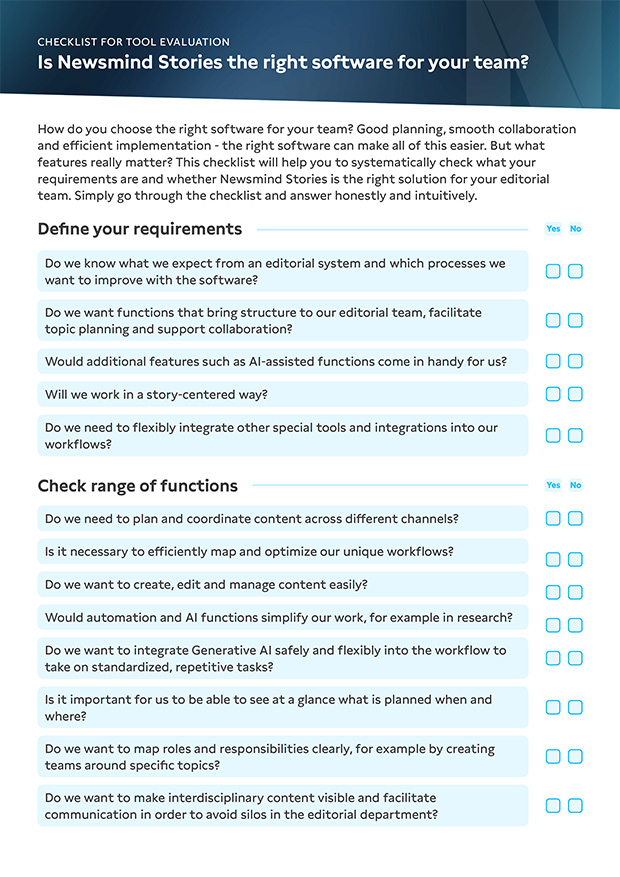
Is Newsmind Stories the right software for your team?
Our checklist will help you to check what your requirements are and whether Newsmind Stories is the right solution for your team.
What is the difference between publishing software and editorial software?
With the digital transformation of the media industry, web-based content management systems have become increasingly important for media companies. Unlike desktop publishing (DTP) software, they focus not only on layout but on the entire process surrounding editorial workflows. It enables publishers to create, manage, and distribute their content across various digital channels.
This means that the entire content work comes together in one editorial system. From planning and creation to cross-media distribution on all channels. Collaboration in teams or across departments is also an important keyword here. Editorial software therefore helps companies not only to create, but also to work more efficiently. An innovative editorial system even offers analysis and reporting tools for publishers so that they can work directly with the data and insights.
→ Best Practice for using digital publishing software
When working with a layout program or DTP software, it is therefore important that editorial teams ensure compatibility with the editorial system. Only then can they tackle cross-platform publishing and automate publishing processes without having to worry about the different channels and media.
As digitalization is more than just software, read our strategy paper to find out how editorial teams can successfully digitalise and optimise their processes
Future trends in digital publishing
What does the future hold? As in other areas, in digital publishing too, the integration of AI and machine learning, as well as optimization through data and analysis, will lead to new revenue opportunities and more innovative solutions. Especially when combined with an AI-based editorial system, new possibilities emerge for publishers and companies in terms of monitoring and personalized experiences, enabling them to reach and engage their target audiences more effectively.
Above all, AI will also increase productivity in publishing: a key trend is increasing automation in publishing companies. AI-driven ad placements, automatically created layouts and formatting or AI-based automated content updates will greatly increase the efficiency of workflows and productivity across the sector.
One thing that won’t change in the future, however, is that effective collaboration between people and AI systems remains crucial to success.

More interesting articles that you shouldn’t miss